Container technology is a revolutionary innovation that has fundamentally transformed modern software development and deployment. Docker is the key platform that popularized this container technology, and since its introduction in 2013, it has become the standard for microservices architecture, CI/CD pipelines, and cloud-native computing.
History of Container Technology and the Birth of Docker
What is a Container?
A container is a lightweight virtualization technology that packages an application along with all its dependencies (libraries, configuration files, binaries, etc.) into a single standardized package, enabling identical execution anywhere.
Evolution of Container Technology
The concept of containers existed long before Docker emerged. Operating system-level isolation technology has evolved over decades.
| Year | Technology/Event | Description |
|---|---|---|
| 1979 | chroot | File system isolation technology introduced in Unix V7, providing isolated environment by changing process root directory |
| 2000 | FreeBSD Jails | Extended chroot to implement complete isolation of processes, network, and file system |
| 2001 | Linux VServer | Kernel patch for server virtualization in Linux, providing resource isolation |
| 2004 | Solaris Zones | Operating system-level virtualization technology developed by Sun Microsystems |
| 2006 | Process Containers | Process resource limiting technology developed by Google, later evolved into cgroups |
| 2008 | LXC (Linux Containers) | First complete container implementation utilizing Linux kernel’s cgroups and namespaces |
| 2013 | Docker Launch | Container platform developed by dotCloud, marking the beginning of container technology popularization |
| 2014 | Kubernetes Announced | Google open-sources container orchestration platform |
| 2015 | OCI Founded | Open Container Initiative established, beginning container standardization |
| 2017 | containerd Separated | Container runtime separated from Docker as independent project |
Background of Docker’s Emergence
Before Docker emerged, software deployment faced numerous challenges. The “Works on my machine” problem frequently occurred due to differences between development and production environments, and deployment processes were complex and error-prone due to different library versions, operating system configurations, and dependency conflicts across servers.
Solomon Hykes and the dotCloud team first unveiled Docker at PyCon in 2013. They wrapped the existing LXC-based container technology with user-friendly tools and image formats, making it accessible to developers. Subsequently, they developed their own container runtime called libcontainer to remove the LXC dependency.
Comparing Containers and Virtual Machines
What is a Virtual Machine?
A virtual machine is a technology that creates virtual computers containing complete operating systems on top of physical hardware through a hypervisor. Each VM runs an independent kernel, operating system, and applications.
Architecture Comparison
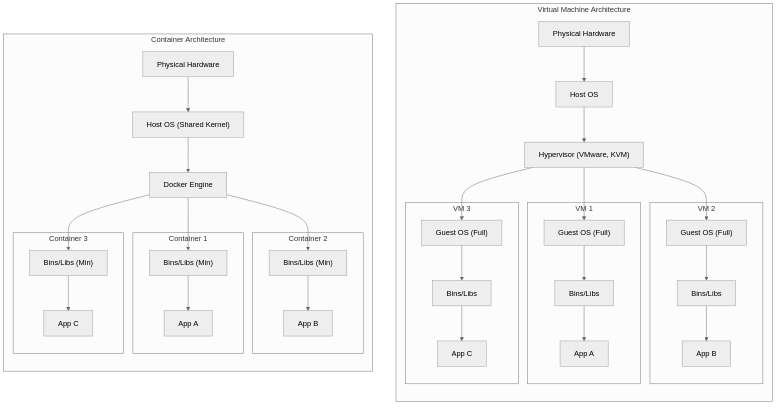
Detailed Comparison Table
| Comparison | Virtual Machine (VM) | Container (Docker) |
|---|---|---|
| Virtualization Level | Hardware level (Hypervisor) | OS level (Kernel sharing) |
| Operating System | Full OS per VM (several GB) | Shares host OS kernel (several MB) |
| Startup Time | Minutes (OS boot required) | Seconds (Process start) |
| Resource Usage | High (Memory, CPU allocation per OS) | Low (Uses only needed resources) |
| Image Size | Several GB to tens of GB | Tens of MB to hundreds of MB |
| Isolation Level | Strong (Complete hardware isolation) | Relatively weak (Kernel sharing) |
| Portability | Requires hypervisor compatibility | Runs anywhere with Docker engine |
| Density | Tens per host | Hundreds to thousands per host |
| Security | High security with strong isolation | Potential vulnerabilities from kernel sharing |
| Use Cases | Heterogeneous OS, complete isolation needed | Microservices, CI/CD, cloud-native |
Docker Core Components
Docker Engine
What is Docker Engine?
Docker Engine is a client-server application that builds and runs containers. It consists of the Docker daemon (dockerd), REST API, and CLI (docker), managing the entire container lifecycle.
Docker Engine comprises three main components, each performing the following roles:

Docker Image
What is a Docker Image?
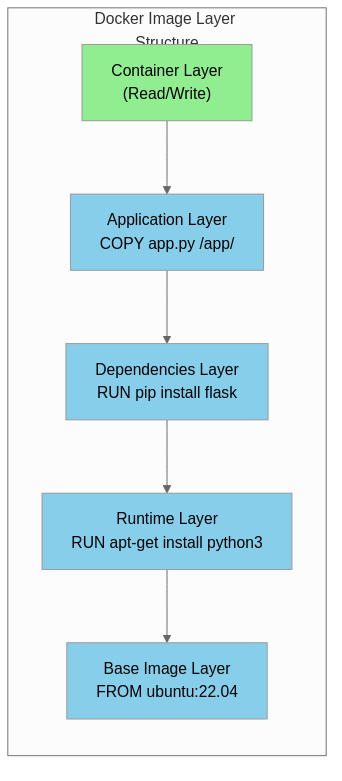
A Docker Image is a read-only template containing the file system and configuration needed for container execution. It consists of multiple layers that support efficient storage and transfer, and is created through Dockerfiles.
Docker Images have a layered structure that saves storage space and improves image build and deployment speed by sharing common layers.
Dockerfile
A Dockerfile is a text file containing instructions to create a Docker Image. It defines the entire image build process from base image selection to application installation, environment configuration, and execution commands.
# Specify base image (Python 3.11 slim version)
FROM python:3.11-slim

# Add metadata
LABEL maintainer="[email protected]"
LABEL version="1.0"

# Set environment variables
ENV PYTHONDONTWRITEBYTECODE=1
ENV PYTHONUNBUFFERED=1

# Set working directory
WORKDIR /app

# Copy and install dependencies (leverage layer caching)
COPY requirements.txt .
RUN pip install --no-cache-dir -r requirements.txt

# Copy application code
COPY . .

# Create and switch to non-root user (security)
RUN useradd --create-home appuser
USER appuser

# Expose port
EXPOSE 8000

# Configure health check
HEALTHCHECK --interval=30s --timeout=3s \
    CMD curl -f http://localhost:8000/health || exit 1

# Container start command
CMD ["python", "app.py"]
Key Dockerfile Instructions
| Instruction | Description | Example |
|---|---|---|
| FROM | Specify base image | FROM python:3.11-slim |
| RUN | Execute command during image build | RUN apt-get update && apt-get install -y curl |
| COPY | Copy host files to image | COPY . /app |
| ADD | Similar to COPY but supports URL and tar extraction | ADD https://example.com/file.tar.gz /tmp/ |
| WORKDIR | Set working directory | WORKDIR /app |
| ENV | Set environment variables | ENV NODE_ENV=production |
| EXPOSE | Document container port | EXPOSE 8080 |
| CMD | Default command at container start | CMD ["node", "server.js"] |
| ENTRYPOINT | Fixed command at container start | ENTRYPOINT ["python"] |
| ARG | Build-time variables | ARG VERSION=1.0 |
| VOLUME | Specify volume mount point | VOLUME /data |
| USER | Specify execution user | USER appuser |
Docker Registry
What is Docker Registry?
Docker Registry is a server-side application for storing and distributing Docker images. Docker Hub is the most prominent public registry, while enterprise environments use private registries such as Harbor, AWS ECR, and GCR.
| Registry | Type | Features |
|---|---|---|
| Docker Hub | Public | Largest public registry, provides official images |
| GitHub Container Registry | Public/Private | GitHub integration, GitHub Actions interoperability |
| AWS ECR | Private | AWS service integration, IAM-based access control |
| Google GCR/Artifact Registry | Private | GCP service integration, vulnerability scanning |
| Azure ACR | Private | Azure service integration, geo-replication |
| Harbor | Self-hosted | CNCF project, security scanning, RBAC |
How Docker Works
Docker implements container isolation and resource limiting using core Linux kernel features called namespaces and control groups (cgroups), and performs efficient image layer management through the Union File System (UnionFS).
Linux Namespace
Namespaces are a Linux kernel feature that provides isolated environments by limiting the scope of system resources visible to processes.
| Namespace | Isolation Target | Description |
|---|---|---|
| PID | Process ID | Processes in container use independent PID space |
| NET | Network | Independent network interfaces, IP addresses, routing tables |
| MNT | File system mounts | Independent mount points |
| UTS | Hostname, domain name | Independent hostname per container |
| IPC | Inter-process communication | Independent shared memory, semaphores |
| USER | User/Group ID | Container root can be regular user on host |
| CGROUP | cgroup root directory | Independent view of resource limits |
Control Groups (cgroups)
Cgroups is a Linux kernel feature for limiting, accounting, and isolating resource usage of process groups. Docker uses this to limit CPU, memory, disk I/O, and network bandwidth per container.
# Container resource limiting example
docker run -d \
    --name myapp \
    --cpus="2.0" \                  # Limit to 2 CPU cores
    --memory="1g" \                 # Limit memory to 1GB
    --memory-swap="2g" \            # Limit including swap to 2GB
    --blkio-weight=500 \            # Block I/O weight
    myapp:latest
Union File System
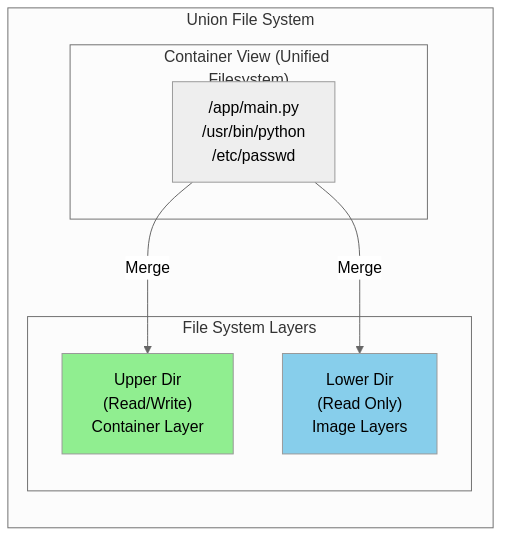
Union File System is a technology that provides multiple file system layers as a single unified view. Docker uses OverlayFS as the default storage driver to efficiently manage image layers.
Docker Advantages and Use Cases
Key Advantages of Docker
| Advantage | Description |
|---|---|
| Environment Consistency | Guarantees identical execution environment across development, testing, and production |
| Fast Deployment | Image-based deployment enables application start within seconds |
| Resource Efficiency | Lower overhead than VMs, higher container density |
| Isolation | Prevents dependency conflicts between applications |
| Portability | “Build once, run anywhere” - runs anywhere with Docker |
| Version Control | Easy version management and rollback through image tags |
| Scalability | Easy horizontal scaling with orchestration tool integration |
Real-World Use Cases
Microservices Architecture
# docker-compose.yml example
version: '3.8'
services:
  api-gateway:
    image: api-gateway:latest
    ports:
      - "80:8080"
    depends_on:
      - user-service
      - order-service

  user-service:
    image: user-service:latest
    environment:
      - DB_HOST=user-db
    depends_on:
      - user-db

  order-service:
    image: order-service:latest
    environment:
      - DB_HOST=order-db
    depends_on:
      - order-db

  user-db:
    image: postgres:15
    volumes:
      - user-data:/var/lib/postgresql/data

  order-db:
    image: postgres:15
    volumes:
      - order-data:/var/lib/postgresql/data

volumes:
  user-data:
  order-data:
CI/CD Pipelines
Container-based CI/CD ensures build environment consistency, increases pipeline reproducibility, and reduces build time through build caching.
# GitHub Actions example
name: Build and Deploy
on:
  push:
    branches: [main]

jobs:
  build:
    runs-on: ubuntu-latest
    steps:
      - uses: actions/checkout@v4

      - name: Build Docker image
        run: docker build -t myapp:${{ github.sha }} .

      - name: Push to Registry
        run: |
          docker tag myapp:${{ github.sha }} registry.example.com/myapp:${{ github.sha }}
          docker push registry.example.com/myapp:${{ github.sha }}

      - name: Deploy to Kubernetes
        run: |
          kubectl set image deployment/myapp myapp=registry.example.com/myapp:${{ github.sha }}
Development Environment Standardization
Using Docker allows all team members to work in identical development environments, significantly reducing onboarding time for new team members and fundamentally preventing bugs caused by environment differences.
# Start development environment
docker-compose -f docker-compose.dev.yml up -d

# Includes dependent services like database, cache, message queue
# All developers can work in identical environment
Docker Ecosystem and Future
Container Orchestration
Orchestration tools are needed for large-scale Docker container operations, with Kubernetes having become the de facto standard.
| Tool | Features |
|---|---|
| Kubernetes | CNCF project, de facto industry standard, powerful ecosystem |
| Docker Swarm | Built into Docker, simple configuration, suitable for small clusters |
| Amazon ECS | AWS managed service, tight integration with AWS services |
| Nomad | HashiCorp product, simple architecture, supports non-container workloads |
OCI Standards
The Open Container Initiative (OCI) defines industry standards for container image formats and runtimes. Various implementations including Docker, containerd, and CRI-O comply with these standards to ensure interoperability.
The Future of Container Technology
Container technology continues to evolve as the core of cloud-native computing, expanding into new areas such as WebAssembly (Wasm) integration, serverless containers, enhanced security, and edge computing support.
Conclusion
Docker is a revolutionary platform that popularized container technology, fundamentally changing how applications are developed, deployed, and operated. Based on Linux kernel namespaces and cgroups, it provides lightweight yet effective isolated environments, and enables efficient storage and deployment through its layer-based image system.
Container technology has become an essential element in modern software development as the foundational technology for microservices architecture, CI/CD pipelines, and cloud-native applications. Combined with orchestration tools like Kubernetes, it has established itself as the standard for operating large-scale distributed systems.