Overview
When accessing websites on the internet, we use domain names instead of IP addresses. DNS (Domain Name System) is the system that translates these domain names into actual server IP addresses. Often compared to the internet’s phone book, DNS was designed by Paul Mockapetris in 1983 and has since become a core internet infrastructure. It processes billions of DNS queries daily, enabling users to access web services using intuitive domain names like www.example.com without memorizing complex IP addresses like 192.168.0.1 or 2001:4860:4860::8888.
What is DNS (Domain Name System)?
DNS is a distributed database system that translates human-readable domain names (e.g., www.example.com) into computer-understandable IP addresses (e.g., 93.184.216.34). Hierarchical name servers distributed worldwide cooperate to provide domain name resolution services, and it is standardized by IETF in RFC 1034 and RFC 1035.
The Origins of DNS
In the early days of the internet during the 1970s, when the number of hosts connected to the network was only in the hundreds, a single text file called HOSTS.TXT managed by Stanford Research Institute (SRI) was used to map host names to IP addresses. Network administrators periodically downloaded this file via FTP and applied it to their systems (/etc/hosts). HOSTS.TXT was a simple and easy-to-understand method, but as ARPANET grew and the number of hosts increased dramatically, the centralized file management approach revealed serious limitations in terms of scalability (file size growth), consistency (update conflicts), and traffic (download load).
In 1983, Paul Mockapetris designed DNS as a distributed, hierarchical name resolution system to solve these problems. He defined the concepts and implementation of DNS in RFC 882 and RFC 883 (later replaced by RFC 1034 and RFC 1035 in 1987). The core design goals of DNS were to provide a name resolution service that operates reliably in large-scale internet environments through distributed management authority (each organization independently manages its own domain), scalable hierarchical structure (supporting millions of domains), and efficient caching (minimizing repetitive queries). This design philosophy remains valid 40 years later.
Core Functions of DNS
DNS performs roles beyond simply translating domain names to IP addresses, providing multiple functions to support various requirements of modern internet services.
Forward Lookup: The most basic DNS function that translates domain names to IP addresses. Most DNS queries that occur when users enter URLs in web browsers fall into this category. A records (IPv4) and AAAA records (IPv6) are used for forward lookups.
Reverse Lookup: A function that translates IP addresses to domain names, primarily used for log analysis (displaying IP as domain in web server access logs), email server spam prevention (verifying forward/reverse DNS match of sender server), and network diagnostics. Implemented through the special domains in-addr.arpa (IPv4) or ip6.arpa (IPv6), using PTR records.
Mail Routing: MX (Mail Exchanger) records specify which mail servers handle email for a particular domain. Priority values (lower is higher priority) support load balancing and failover between multiple mail servers. Mail senders query the MX records of the recipient’s domain to determine which mail server to send to.
Load Balancing: Distributes traffic across multiple servers by mapping multiple IP addresses to a single domain (round-robin DNS) or implementing weight-based routing. Geographic DNS (GeoDNS) returns the IP address of the closest server based on user location to minimize latency. DNS-based load balancing is simple but has limited health check capabilities.
Service Discovery: SRV (Service) records enable searching for hosts and ports that provide specific services. Used in VoIP (SIP), messaging protocols (XMPP), microservices architectures (Kubernetes service discovery), and Active Directory environments, allowing clients to dynamically find service providers.
DNS Hierarchical Structure
DNS organizes domain names in a hierarchical structure separated by dots (.), divided into layers including Root, Top-Level Domain (TLD), Second-Level Domain, and Subdomain. This hierarchical structure allows DNS management authority to be distributed so that each organization can independently manage its own domain, and enables building scalable systems without a single point of failure.
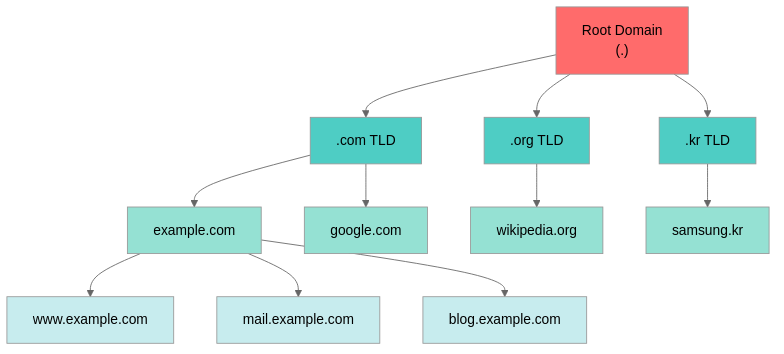
Root Domain
The root domain at the top of the DNS hierarchy is represented by an empty string and shown as a trailing dot in FQDN (Fully Qualified Domain Name) format (e.g., www.example.com.). It is managed by 13 root name server clusters (A-root through M-root, a.root-servers.net through m.root-servers.net) distributed worldwide. More than 13 physical servers actually exist, with hundreds of server instances deployed worldwide through Anycast technology. Users automatically connect to the nearest root server, ensuring high availability (over 99.99%) and low latency. Root name servers are operated by ICANN (Internet Corporation for Assigned Names and Numbers) and various partner organizations including Verisign, NASA, US Army, and University of Maryland.
Top-Level Domain (TLD)
Top-level domains located directly below the root are broadly divided into generic TLDs (gTLDs), country code TLDs (ccTLDs), and special-purpose TLDs.
Generic TLDs (gTLDs): Range from traditional gTLDs like .com (commercial), .net (network), and .org (non-profit organizations) to new gTLDs introduced through ICANN’s New gTLD Program in 2013, such as .app (applications), .dev (developers), .io (tech startups), .cloud (cloud services), and .ai (artificial intelligence). Over 1,500 gTLDs exist, with ICANN-approved registries managing each gTLD. For example, Verisign manages .com and .net, Public Interest Registry manages .org, and Internet Computer Bureau manages .io.
Country Code TLDs (ccTLDs): Domains based on ISO 3166-1 alpha-2 country codes such as .kr (Korea), .jp (Japan), .uk (United Kingdom), .de (Germany), and .cn (China). Over 250 exist worldwide, managed by each country’s NIC (Network Information Center) or designated organization, with registration requirements varying according to each country’s laws and policies. Korea’s .kr is managed by KISA (Korea Internet & Security Agency), and some ccTLDs (.tv, .io, .ai, etc.) have been reinterpreted as marketing domains for tech services and gained popularity.
Second-Level Domain
Second-level domains located directly below TLDs are domains that individuals or organizations can register through domain registrars (GoDaddy, Namecheap, Cloudflare, etc.). In example.com, ’example’ is the second-level domain and .com is the TLD. Domain registrants have management authority over second-level domains, can designate authoritative name servers, configure DNS records, and freely create subdomains below them. Domains operate on an annual renewal basis, and if not renewed, they can be registered by others after expiration.
Subdomain
Subdomains located below second-level domains can be freely created and managed by domain owners at no additional cost. In www.example.com, ‘www’ is the subdomain, and unlimited subdomains can be created in forms like blog.example.com, mail.example.com, and api.example.com. Subdomains are used for various purposes including service differentiation within organizations (mail.example.com, ftp.example.com, cdn.example.com), environment differentiation (dev.example.com, staging.example.com, prod.example.com), and regional differentiation (us.example.com, asia.example.com). Subdomains of subdomains (api.dev.example.com) can also be created.
DNS Resolution Process
When a user enters a domain name in a web browser, the DNS resolution process begins. This process consists of a combination of recursive and iterative queries, maximizing efficiency through multiple levels of caching.
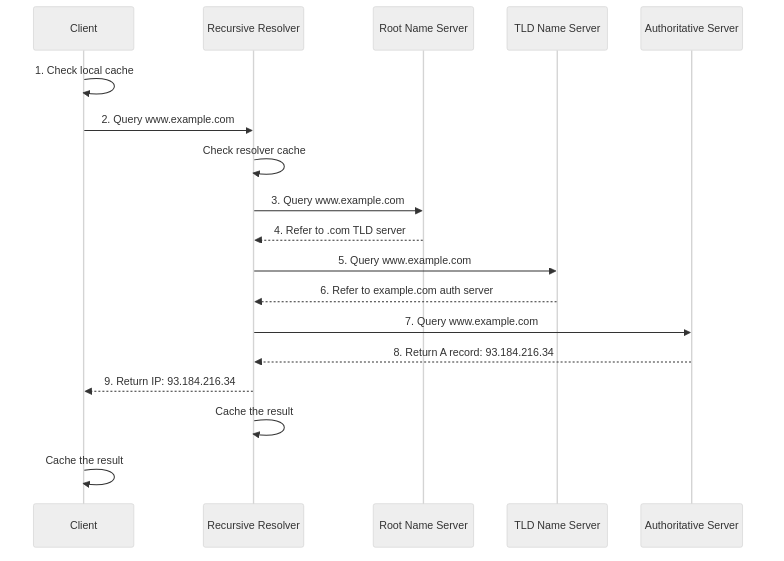
Step 1: Local Cache Check
The operating system first checks the local DNS cache to see if the IP address for the domain exists in the cache. If it exists, the cached IP address is immediately returned, completing resolution without network requests. On Linux, the /etc/hosts file is also referenced. Host names defined in this file have higher priority than DNS queries, allowing system administrators to manually map specific domains to desired IP addresses. On Windows, C:\Windows\System32\drivers\etc\hosts serves the same role.
Step 2: Query to Resolver
If the information is not in the local cache, the operating system sends a recursive query to the configured DNS resolver (typically the ISP’s DNS server or public DNS servers like Google DNS (8.8.8.8) or Cloudflare DNS (1.1.1.1)). The resolver has the responsibility to complete the DNS resolution process on behalf of the client. If the information is in its own cache, it immediately returns the cached response; otherwise, it proceeds to the next step and sends iterative queries to other name servers until obtaining the final response.
Step 3: Root Name Server Query
If the information is not in the resolver cache, the resolver sends an iterative query to a root name server (one of 13 clusters). The root name server does not know the final IP address, so it returns the address of the TLD name server responsible for that TLD (.com, .net, .org, etc.) as a response. Root name servers serve as the entry point for DNS queries worldwide, but thanks to efficient caching, queries that actually reach root servers are less than 1% of the total. Most resolvers cache TLD name server addresses for extended periods.
Step 4: TLD Name Server Query
The resolver sends a query to the TLD name server address (for .com, operated by Verisign) received from the root name server. The TLD name server returns the address of the authoritative name server responsible for that second-level domain (example.com) as a response. For example, the .com TLD name server provides the location (NS records) of the authoritative name server managing the example.com domain, typically returning two or more name server addresses to ensure redundancy.
Step 5: Authoritative Name Server Query
The resolver sends a final query to the authoritative name server address received from the TLD name server. The authoritative name server returns the actual DNS records (A, AAAA, CNAME, MX, etc.) for that domain as a response. The authoritative name server is the server that actually stores and manages DNS information for that domain, providing DNS records configured by the domain owner or administrator. Each record has a TTL value that determines the caching period.
Step 6: Response Return and Caching
The resolver stores the response (IP address) received from the authoritative name server in its own cache for the TTL period and returns the final IP address to the client. The client’s operating system and web browser also store this information in their respective caches. The validity period of cached information is determined by the TTL (Time To Live) value. When the TTL expires, a new resolution process begins on the next query. This multi-level caching structure enables fast processing of repetitive queries to the same domain and significantly reduces the load on upstream name servers.
Types of DNS Servers
Each server in the DNS ecosystem performs a unique role, and their cooperation enables distributed name resolution services.
Recursive Resolver
Recursive resolvers are servers that receive DNS queries from clients and find and return the final IP address. ISP-provided DNS servers and public DNS servers like Google Public DNS (8.8.8.8, 8.8.4.4), Cloudflare DNS (1.1.1.1, 1.0.0.1), OpenDNS (208.67.222.222, 208.67.220.220), and Quad9 (9.9.9.9) fall into this category. Resolvers cache responses to reduce repetitive queries and improve response speed (typically within 5-50ms), and may also provide additional features such as DNSSEC validation (response integrity verification), malicious domain blocking (malware and phishing site filtering), query logging, and privacy protection (query encryption, no-log policies).
Root Name Server
Root name servers provide TLD name server information at the top of the DNS hierarchy. There are 13 logical root servers from A to M, operated at over 1,500 locations worldwide through Anycast. The reason for limiting to 13 is that DNS uses UDP and there is a UDP packet size limit (512 bytes, 4096 bytes with EDNS0). In reality, each root server instance is distributed worldwide. Root server operators include various organizations such as Verisign (a.root-servers.net, j.root-servers.net), USC-ISI (b.root-servers.net), ICANN (l.root-servers.net), NASA (e.root-servers.net), US Army (e.root-servers.net), Internet Systems Consortium (f.root-servers.net), and Netnod (i.root-servers.net).
TLD Name Server
TLD name servers provide authoritative name server information for second-level domains of specific top-level domains and are operated by each TLD registry. For example, Verisign operates the .com and .net TLD name servers (distributed across 13 clusters worldwide), KISA (Korea Internet & Security Agency) operates the .kr TLD name servers (consisting of 4 name servers), and Public Interest Registry operates the .org TLD name servers. TLD name servers manage information for millions to tens of millions of domains and utilize GeoDNS and Anycast for high performance and availability.
Authoritative Name Server
Authoritative name servers are servers that actually store and manage DNS records for specific domains. They are either operated directly by domain owners (using software like BIND, PowerDNS, NSD) or managed through DNS hosting services (AWS Route 53, Cloudflare DNS, Google Cloud DNS, Azure DNS, etc.). Only authoritative name servers are the official source of truth for DNS information of that domain. Other servers cache and provide this information. Typically, two or more authoritative name servers are operated (Primary, Secondary) to ensure redundancy and failover.
Major DNS Record Types
DNS records store various information about domains, with each record type serving a specific purpose.
A Records and AAAA Records
A records (Address Records) map domain names to IPv4 addresses (32-bit), and AAAA records map to IPv6 addresses (128-bit). Multiple A or AAAA records can be set for a single domain to implement round-robin load balancing or failover. Most DNS clients preferentially use AAAA records when both IPv4 and IPv6 are supported, falling back to A records on failure.
example.com.    IN    A       93.184.216.34
example.com.    IN    AAAA    2606:2800:220:1:248:1893:25c8:1946
CNAME Records
CNAME (Canonical Name) records are alias records that map domain names to other domain names. They are useful when multiple subdomains point to the same server, and management is convenient because only the CNAME target needs to be changed when the server IP address changes. CNAME records cannot coexist with other records (according to RFC 1034, CNAME cannot be used at the same level as MX, TXT, NS, etc.), and it should be considered that additional queries (CNAME chasing) are needed during DNS resolution, resulting in slight performance overhead.
www.example.com.      IN    CNAME    example.com.
blog.example.com.     IN    CNAME    example.com.
MX Records
MX (Mail Exchanger) records specify mail servers that handle email for that domain and set preferences among multiple mail servers through priority values (0-65535). Lower priority values mean higher preference (e.g., 10 has priority over 20), and servers with the same priority are randomly selected for load balancing. When sending mail, SMTP clients first attempt to connect to the server with the lowest priority (smallest number), falling back to the next priority server on connection failure.
example.com.    IN    MX    10    mail1.example.com.
example.com.    IN    MX    20    mail2.example.com.
example.com.    IN    MX    20    mail3.example.com.
TXT Records
TXT records store arbitrary text data and are primarily used for domain ownership verification (Google Search Console, SSL certificate issuance), email authentication (SPF, DKIM, DMARC), and security policy publication (CAA). SPF (Sender Policy Framework) records specify the IP addresses or domains of servers that can send email from that domain to prevent spam and phishing. DKIM adds digital signatures to emails to prevent forgery and tampering. DMARC defines how to handle SPF and DKIM validation failures.
example.com.    IN    TXT    "v=spf1 include:_spf.google.com ~all"
example.com.    IN    TXT    "google-site-verification=abc123xyz"
NS Records
NS (Name Server) records specify authoritative name servers responsible for a specific domain and are used for domain delegation. Multiple NS records can be set for a single domain to implement redundancy and load balancing. It is generally recommended to specify at least two name servers, with RFC recommending 2-7. NS records exist in both the parent zone and child zone, with parent zone NS records indicating delegation and child zone NS records indicating authority.
example.com.    IN    NS    ns1.example.com.
example.com.    IN    NS    ns2.example.com.
SOA Records
SOA (Start of Authority) records define authority information and operational parameters for a DNS zone, including primary name server, administrator email (. instead of @), zone serial number (increments when zone file changes), refresh interval (how often secondary servers check for zone updates from primary server), retry interval (retry period on connection failure), expiration time (validity period of secondary server data when primary server is unreachable), and minimum TTL (negative TTL, caching period for non-existent records). There must be only one SOA record per zone (RFC 1035), and it affects zone transfer (AXFR/IXFR) and caching behavior.
SRV Records
SRV (Service) records specify the location (domain) and port of hosts providing specific services, including service name (_service), protocol (_tcp or _udp), priority (lower is higher), weight (load balancing ratio within same priority), port (service port number), and target host (actual server domain). They are used for service discovery in protocols such as LDAP (directory service), SIP (VoIP), XMPP (messaging), and Minecraft (game server). Kubernetes also uses SRV records for service discovery.
_ldap._tcp.example.com.    IN    SRV    10 0 389 ldap.example.com.
_minecraft._tcp.example.com. IN  SRV    0 5 25565 mc1.example.com.
PTR Records
PTR (Pointer) records are used for reverse DNS lookup that maps IP addresses to domain names and are set under the special domains in-addr.arpa (IPv4) or ip6.arpa (IPv6). They are used for forward/reverse DNS match verification of mail servers (many mail servers check PTR records for sender IP addresses for spam filtering), network diagnostics (displaying host names in traceroute results), and log analysis (displaying domains instead of IPs in web server logs). The PTR record for IPv4 address 93.184.216.34 is expressed in reverse order as 34.216.184.93.in-addr.arpa.
DNS Caching and TTL
DNS caching is a key mechanism that improves DNS query response speed and reduces network traffic. It occurs at multiple levels including browser cache, operating system cache, and resolver cache. Without caching, all DNS queries would have to start from root servers, and the internet would not function properly.
TTL (Time To Live)
TTL specifies the maximum time in seconds that DNS records can be stored in cache and is set for each record by the authoritative name server. Low TTL values (60-300 seconds) allow DNS changes to propagate quickly (advantageous for failover and A/B testing) but increase query load. High TTL values (3600-86400 seconds) have high caching efficiency and reduce name server load but have slow change propagation.
Generally, high TTL (3600-86400 seconds) is set for stable services, and low TTL (60-300 seconds) for services with frequent changes or where failover is important. A strategy of lowering TTL before DNS migration or server relocation (e.g., to 300 seconds) and raising it again after completion (e.g., to 3600 seconds) is also used. Cloudflare sets default TTL to automatic (Auto), and AWS Route 53 recommends 60 seconds.
Caching Levels
Browser Cache: Web browsers maintain their own DNS cache (Chrome has 60-second default TTL), which can be viewed and managed at chrome://net-internals/#dns (Chrome) or about:networking#dns (Firefox). Browser cache provides the fastest response speed but is cleared on browser restart.
Operating System Cache: Operating systems maintain DNS cache used system-wide. On Windows, it can be viewed with ipconfig /displaydns and cleared with ipconfig /flushdns. On Linux using systemd-resolved, use resolvectl statistics or resolvectl flush-caches. On macOS, use sudo dscacheutil -flushcache to clear.
Resolver Cache: DNS resolvers cache responses to client queries to reduce queries to upstream servers and improve response speed. Resolver cache is shared by numerous clients, so caching efficiency is highest. Typically, hundreds of GB of memory are used to cache millions of records.
DNS Security
DNS did not consider security much during its 1983 design, so it is exposed to various security threats. Several security mechanisms have been developed to address these.
DNS Spoofing and Cache Poisoning
An attack where attackers inject forged DNS responses to redirect users to malicious sites. Cache poisoning inserts forged records into a resolver’s cache, affecting all users using that resolver. The vulnerability discovered by Dan Kaminsky in 2008 involved brute-forcing the DNS query transaction ID (16 bits) to insert forged responses, mitigated through source port randomization.
DNSSEC (DNS Security Extensions)
DNSSEC is a DNS extension that adds digital signatures to DNS responses to verify data integrity and origin. Standardized in RFC 4033-4035 in 2005, it uses RRSIG (signature records), DNSKEY (public keys), DS (delegation signer), and NSEC/NSEC3 (proof of non-existence) records to construct a chain of trust from root to target domain. DNSSEC effectively prevents DNS spoofing and cache poisoning, but it is only effective when all domains and resolvers support DNSSEC. It has disadvantages of high implementation complexity, increased response size, and zone enumeration vulnerabilities.
DNS over HTTPS (DoH) and DNS over TLS (DoT)
DoH (RFC 8484, 2018) and DoT (RFC 7858, 2016) are protocols that encrypt DNS queries to prevent eavesdropping and tampering by intermediaries. DoH uses HTTPS port (443) to hide in regular web traffic and can bypass firewalls. DoT uses dedicated port (853) to provide explicit DNS encryption. Major browsers like Chrome, Firefox, and Edge, and operating systems like Windows 11, Android 9+, and iOS 14+ support DoH and DoT. Public DNS servers like Cloudflare (1.1.1.1), Google (8.8.8.8), and Quad9 (9.9.9.9) also provide encrypted DNS. Encrypted DNS can bypass ISP’s DNS-based filtering and surveillance, improving privacy, but may conflict with corporate network security policies.
CAA Records
CAA (Certification Authority Authorization) records are DNS records that specify which certificate authorities (CA) can issue SSL/TLS certificates for that domain. Standardized in RFC 6844 in 2013, all CAs have been required to check CAA records before issuing certificates since 2017. CAA records prevent unauthorized certificate issuance, mitigating phishing and man-in-the-middle attacks.
example.com.    IN    CAA    0 issue "letsencrypt.org"
example.com.    IN    CAA    0 issuewild ";"
Conclusion
This post covered the Domain Name System in detail, from its historical origins to hierarchical structure, resolution process, various record types, caching mechanisms, and security features. Since its design in 1983, DNS has served as core internet infrastructure for over 40 years, allowing users to easily access services without complex IP addresses. Through distributed hierarchical architecture and efficient caching, it reliably processes hundreds of billions of queries daily. With the introduction of security features like DNSSEC, DoH, and DoT, it continues to evolve into an increasingly secure and privacy-protecting system.